Skip to main
University-wide Navigation
To jump to a topic, click your choice below:
Other Reviewers Comments Attachments
Expedited Reviewer Options Requesting Revisions Completing Review

Expedited Review Contacts

For a personalized training session, please contact one of our Expedited Review staff. The training is approximately 30 minutes.

Medical IRB Nonmedical IRB
Elisa Crill Katie Gieske
Joanne Hines Kimberly Williams
Karen Larson  


Other Reviewers

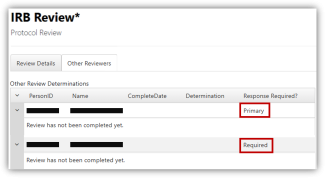
  • Look under the Other Reviewers tab to see if other reviewers have been requested (ex., HIPAA, Consultants)
  • ORI recommends that the primary reviewer wait until the secondary reviewer has conducted their review so that they can take the secondary reviewer's comments into consideration.
IRB Member: Response Required column in E-IRB for protocol review


Comments

  • Go to all comments.
  • Read any comments ORI staff may have for the IRB and/or any comments that ORI made to the PI.
  • Reminder: If you don’t see any comments to the PI, it doesn’t mean ORI didn’t screen the application.
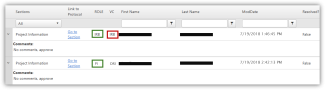
E-IRB Application Comments


Attachments

  • Go to All Attachments and the corresponding sections in the application.
  • Then, read the application as a whole, taking the attachments into consideration.
Attachment list in E-IRB


Expedited Reviewer Options

As an Expedited Reviewer, you have three primary options when completing your review. You can…

  • Approve the Application
  • Request Minor Revisions
  • Request that the application be reviewed by the full board at an upcoming meeting
E-IRB Expedited Reviewer Options


Requesting Revisions

  • If you are requesting revisions to the protocol, you should mark “No” for the relevant section on the IRB reviewer form.
  • For example, below, the reviewer chose “No” for the informed consent compliance question because they did not agree with the PI on waiving informed consent.
The IRB Reviewer chose No on the Expedited Review page because they did not agree with the PI on that section.


Completing Review

When completing your review, go back into the application and double-check the categories that appear on the reviewer sheet. These include:

  • Making sure the expedited category the PI chose is appropriate
  • Checking to see if there is an attached consent document (or cover letter for survey research)
  • If no consent document, check to see whether the PI is requesting a waiver of informed consent/waiver of documentation of informed consent
  • Check whether the study will involve a vulnerable population (on the subject demographics page)
  • Check whether the study involves a drug or device, and whether the PI has submitted appropriate documentation