Skip to main
University-wide Navigation

Overview

What We Do

UK ORI’s philosophy and mission are to promote research within the current ethical, legal, and regulatory framework, ensuring compliance and promoting ethical conduct in Human Research. UK ORI is responsible for human research regulatory compliance at the University of Kentucky, providing services to researchers/staff, including, but not limited to, liaising with the UK Institutional Review Boards (IRBs), HIPAA, research misconduct, and responsible conduct of research.


Training

New IRB Member Training "To Dos"

  • Orientation Session - Includes training on Convened and Expedited IRB Review
  • UK IRB Member Orientation Module - Will receive at orientation
    • Details nine (9) IRB Member responsibilities
  • Mentor
    • Assigned to provide advice & guidance, available to answer questions
  • IRB Member Course
    • CITI Training: IRB Member - What Every New IRB Member Needs to Know
    • CITI Training: IRB Community Members - I Have Agreed to be an IRB Community Member. Now What?
  • Attend and observe an initial convened meeting
  • Review E-IRB Basics and Primary Reviewer tutorials

CITI Training Instructions

  • Click the “UK CITI Access” button on the ORI Training & Education webpage. On the UK Single Sign-On page, use your Link Blue ID (do not include “@uky.edu”) and current Link Blue password to log in to CITI.
Sign in using the UK CITI Access button and entering your linkblue information on the single sign on page.
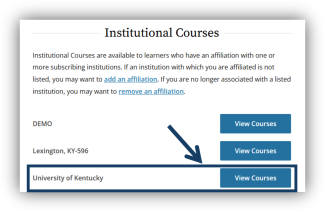
  • Under “Institutional Courses,” click the "View Courses" button to the right of the words University of Kentucky.
Under “Institutional Courses,” click the "View Courses" button to the right of the words University of Kentucky.
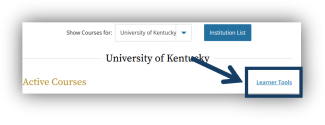
  • Click the "Learner Tools" link or scroll to the bottom of the page.
Click the "Learner Tools" link or scroll to the bottom of the page.
  • Under "Learner Tools for University of Kentucky," click "Add a Course."
Under "Learner Tools for University of Kentucky," click "Add a Course."
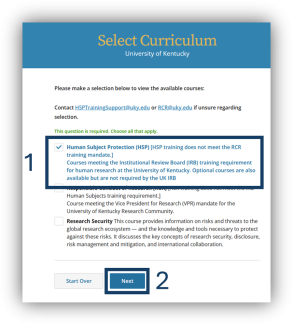
  • On the Select Curriculum page, click the box next to "Human Subject Protection (HSP)." Then click the "Next" button.
On the Select Curriculum page, click the box next to "Human Subject Protection (HSP)." Then click the "Next" button.
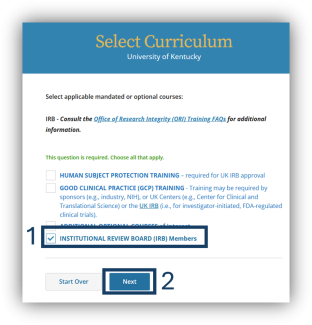
  • For the next question, click the box next to "Institutional Review Board (IRB) Members." Then click the "Next" button.
For the next question, click the box next to "Institutional Review Board (IRB) Members." Then click the "Next" button.

To go to the next step, choose the training you want to complete:

Regular IRB MemberCommunity IRB Member

IRB Member - What Every New IRB Member Needs to Know

  • Click the box next to "IRB Member Training." Then click the "Next" button.
Click the box next to "IRB Member Training." Then click the "Next" button.
  • On your "My Courses" page, scroll down to find "Courses Ready to Begin." Under "IRB Member Training," click the "Start Now" button.
On your "My Courses" page, scroll down to find "Courses Ready to Begin." Under "IRB Member Training," click the "Start Now" button.
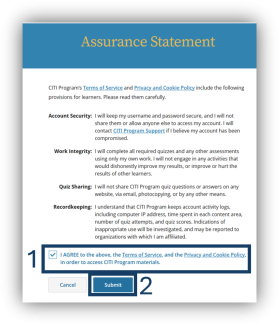
  • Agree to the "Assurance Statement" by clicking the box next to "I AGREE to the above..." Then click the "Submit" button.
Agree to the "Assurance Statement" by clicking the box next to "I AGREE to the above..." Then click the "Submit" button.
  • In the "IRB Member Training" course, under "Required Modules," click the "Start" button next to the module, "The IRB Member Module-'What Every New IRB Member Needs to Know.'"
In the "IRB Member Training" course, under "Required Modules," click the "Start" button next to the module, "The IRB Member Module-'What Every New IRB Member Needs to Know.'"

Please notify Pam Stafford once you have completed the training.

IRB Community Members - I Have Agreed to be an IRB Community Member. Now What?

  • Click the box next to "IRB Community Member Training." Then click the "Next" button.
Click the box next to "IRB Community Member Training." Then click the "Next" button.
  • On your "My Courses" page, scroll down to find "Courses Ready to Begin." Under "IRB Community Members Training," click the "Start Now" button.
On your "My Courses" page, scroll down to find "Courses Ready to Begin." Under "IRB Community Members Training," click the "Start Now" button.
  • Agree to the "Assurance Statement" by clicking the box next to "I AGREE to the above..." Then click the "Submit" button.
Agree to the "Assurance Statement" by clicking the box next to "I AGREE to the above..." Then click the "Submit" button.
  • In the "IRB Community Members Training" course, under "Required Modules," click the "Start" button next to the module, I Have Agreed to be an IRB Community Member. Now What?"
In the "IRB Community Members Training" course, under "Required Modules," click the "Start" button next to the module, I Have Agreed to be an IRB Community Member. Now What?"

Please notify Pam Stafford once you have completed the training.

E-IRB Basics

E-IRB Video Tutorial for IRB Members

The SharePoint site containing this video may prompt you to log-in using your link blue ID and password.

View "E-IRB Basics"

Primary Reviewer

E-IRB Video Tutorial for IRB Members

The SharePoint site containing this video may prompt you to log in using your linkblue ID and password.

View "Serving as Primary Reviewer"

Expedited Reviewer

Optional course for Expedited Reviewers

Tips for Conducting Expedited Review - Suggestions from IRB Members and ORI Staff

Go to the Expedited Review Course

IRB Member Roles

Optional OHRP Webinar (YouTube): Membership Requirements for Institutional Review Boards (IRBs)

View "Membership Requirements for IRBs"